
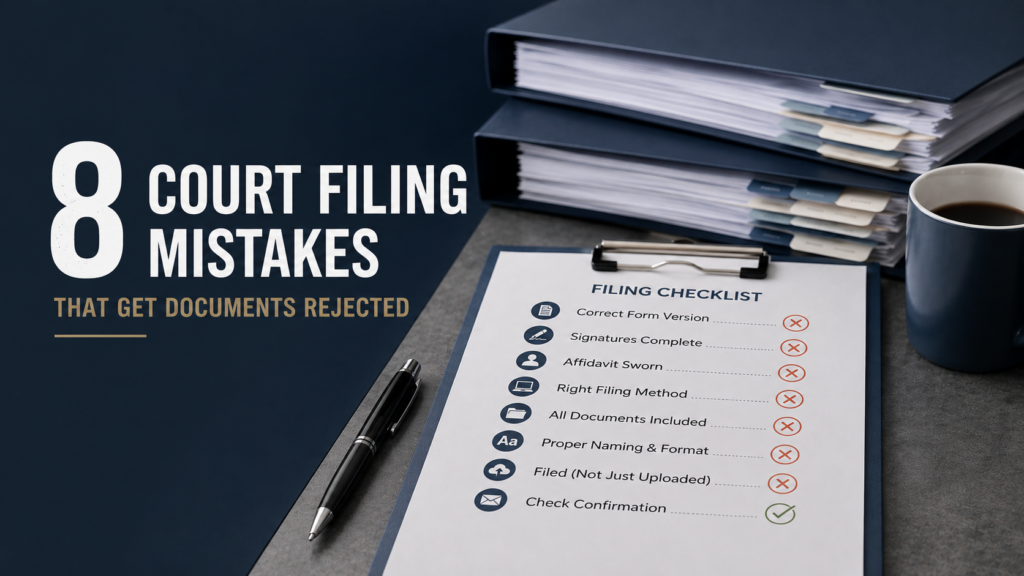
8 Court Filing Mistakes That Get Documents Rejected
Court filing mistakes Ontario applicants make can cause documents to be rejected, returned for correction, or delayed. Common problems include outdated forms, missing signatures, incorrect document formats, and incomplete filing packages. Knowing these issues before submission can help you prepare your documents more carefully and reduce avoidable filing problems.
Why this matters
Court filing mistakes in Ontario are often simple administrative errors. They can still create extra work when documents need to be corrected and submitted again.
The exact requirements depend on the court, proceeding, document, and current practice directions. The Ontario Superior Court of Justice states that parties should follow both provincial and applicable regional practice directions.
The official Ontario Court Forms website is a useful starting point. It warns that some forms have future effective dates and should not be used before they come into force.
Understanding court filing mistakes Ontario professionals see regularly can help you catch problems before submission.
Here is the List:
1. Using the wrong form version
One of the most common court filing mistakes Ontario filers make is using an outdated form.
Ontario Court Forms maintains current and historical versions separately. Forms that have not yet come into force are also identified. Check the current version before preparing your filing package.
Using an old version can result in a filing rejected Ontario situation, depending on the document and applicable requirements.
2. Leaving a required signature missing
A missing signature can create a problem when the applicable document requires you to sign it.
Before submitting, review every signature block. Check whether the document also requires commissioning, witnessing, or another form of execution.
An affidavit is a sworn document. If it must be sworn or affirmed, make sure that step has been completed correctly before filing.
3. Submitting an unsworn affidavit
An unsworn affidavit is another issue that can affect a filing.
If an affidavit is required to be sworn or affirmed, simply completing the written document may not be enough. The applicable procedure must be followed before submission.
The exact requirements for commissioning and electronic signatures can depend on the document and proceeding. Confirm the current requirements before filing.
4. Using the wrong filing method
Different Ontario courts and proceedings can use different filing systems.
For example, the Superior Court’s current civil practice direction expects civil documents to be filed through the applicable online Justice Services Online platforms, subject to limited exceptions.
The Court also maintains different procedures for Small Claims and other proceedings.
This means court filing mistakes Ontario filers make can start before the document is even uploaded.
Check the applicable court instructions first. Do not assume that a filing method used for one matter applies to another.
5. Submitting incomplete documents
A document can look finished while still missing required supporting material.
Check whether your filing needs:
- Supporting affidavits.
- Exhibits.
- Previous orders.
- Endorsements.
- Schedules.
- Attachments.
- Other documents required by the applicable procedure.
The Superior Court’s civil practice direction states that documents filed with the court must include prior orders or endorsements relevant to the request being made.
This is one reason reviewing the entire filing package matters.
6. Ignoring document naming and formatting requirements
Electronic filing has its own technical requirements.
For Superior Court civil matters, the provincial practice direction provides a standard document naming protocol. It also sets requirements for electronic documents and applicable restrictions.
The Court’s Case Center guidance also explains that documents must be placed in the appropriate bundle and section. Documents must follow applicable naming and page requirements.
Requirements can differ between proceedings and regions. Check the current practice direction that applies to your filing.
7. Uploading to Case Center instead of filing
This is a particularly important distinction.
Uploading a document to Case Center does not necessarily mean that you have filed it with the court. The Superior Court expressly states that filing and Case Center uploading are separate steps unless a specific direction provides otherwise.
So, if you are asking why court rejects documents, confusing these two processes can be part of the problem.
File the document through the applicable court filing process first. Then follow the applicable Case Center requirements.
8. Failing to check the submission after filing
Submitting your documents is not always the final step.
Depending on the filing system, the court may review your submission before confirming acceptance. Keep your confirmation emails, receipts, reference information, and accepted documents.
If the court identifies an issue, read the response carefully before making another submission.
From real operating experience, one of the most common problems is receiving a package that appears complete but has one small inconsistency, such as a different party name or date on an attached document.
How to apply this to your matter
The best way to prevent court filing mistakes Ontario issues is to use a short pre-filing review.
Check the court
Confirm that you are filing with the correct court and following the applicable procedure.
Check the documents
Review every document for:
- Correct party names.
- Correct court information.
- Correct court file number.
- Current form version.
- Required signatures.
- Required commissioning.
- Supporting documents.
- Correct file format.
Check the filing method
Confirm whether your documents must be filed online, by another permitted method, or through a specific court process.
The Superior Court provides current filing information and directs parties to applicable provincial and regional practice directions.
Check the final package
Open the files before submission.
Make sure the pages are readable. Confirm that attachments are included. Check that the documents match the information in your court file.
Keep your records
Save the submitted version and any confirmation you receive.
If a filing is rejected, keep the rejection message. It can help you identify what needs to be corrected.
When to use a professional
You can handle many filing tasks yourself if you understand the applicable requirements and have straightforward documents.
Professional administrative support can be useful when you have several documents, multiple filings, urgent work, or filing and service that need to be coordinated.
Select Serve and File Process Server Inc. has served Ontario since 2005. We provide process serving and court filing support.
We are a process serving company, not a law firm. We do not provide legal advice or determine what documents you should file.
If you are unsure about a legal requirement, speak with a licensed Ontario lawyer or paralegal.
The key to avoiding court filing mistakes Ontario problems is simple. Check the current forms, follow the applicable filing process, review every document, and keep proof of what you submitted.
Need documents served in Ontario? Request a quote.
This article provides general information about process serving and court procedure in Ontario. It is not legal advice and does not create a solicitor client relationship. Court rules and procedures change. Confirm current requirements with the relevant court or consult a licensed Ontario lawyer or paralegal before acting.